Features

Everything between the route and the runway

AviBRIEF brings together your fleet, crew, routes, filing, weather and paperwork. Here is what each part does.

Flights

Plan the whole flight, not just the plan

A flight in AviBRIEF holds everything: the aircraft, crew, passengers, route, legs, fuel and documents. Start with the flight rules and the rest follows.

  • VFR, IFR and Y/Z flights, each with the right checks
  • Multi-leg trips: intermediate stops, leg times and passengers per leg
  • Fuel planning: distance, total time, endurance and fuel required
  • Duplicate or reverse: copy a flight for tomorrow, or create the return flight with the route reversed
  • Today, Tomorrow, Upcoming and Archived views of your flights
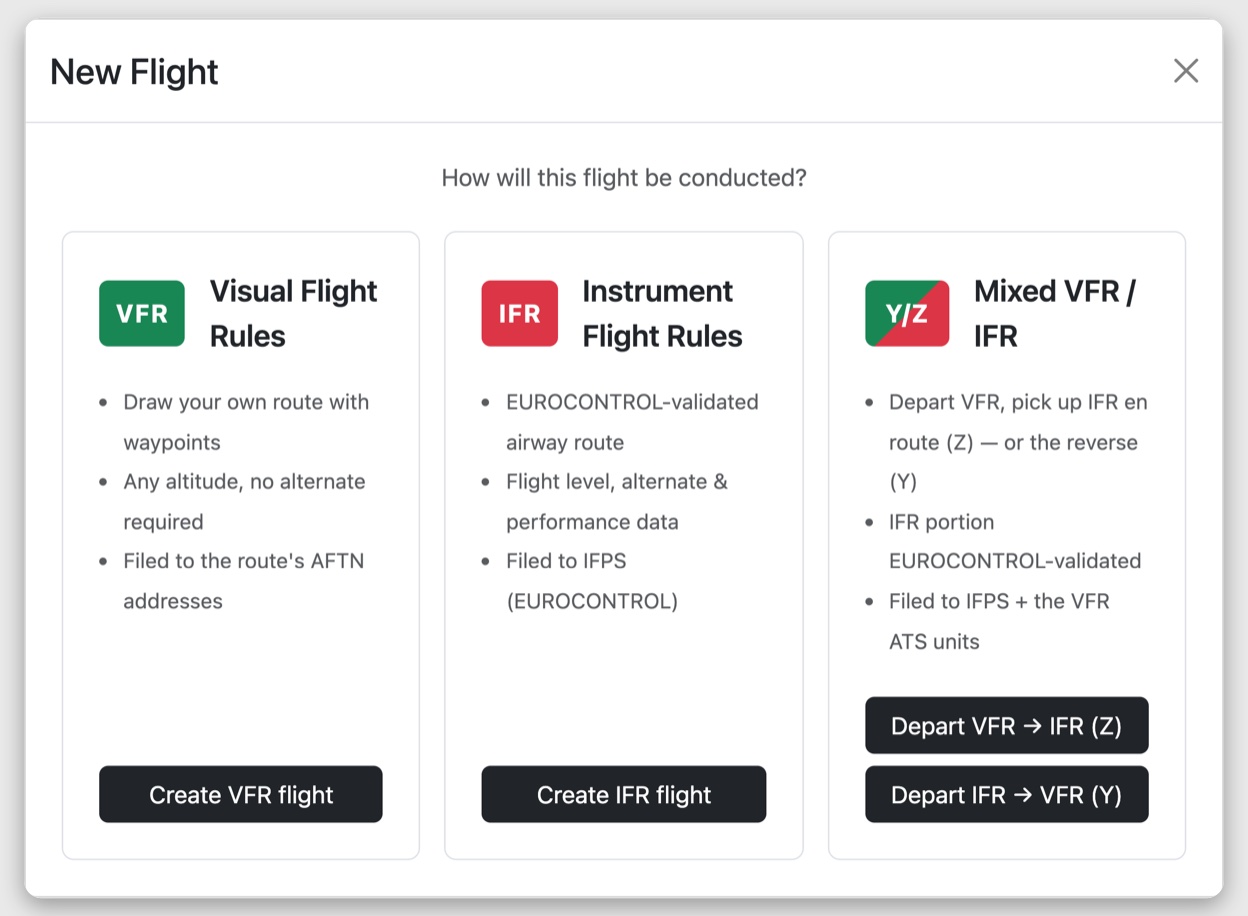
The New Flight dialog in BRIEF: choose VFR, IFR or mixed Y/Z
Flight plan filing

Checked by EUROCONTROL before you file

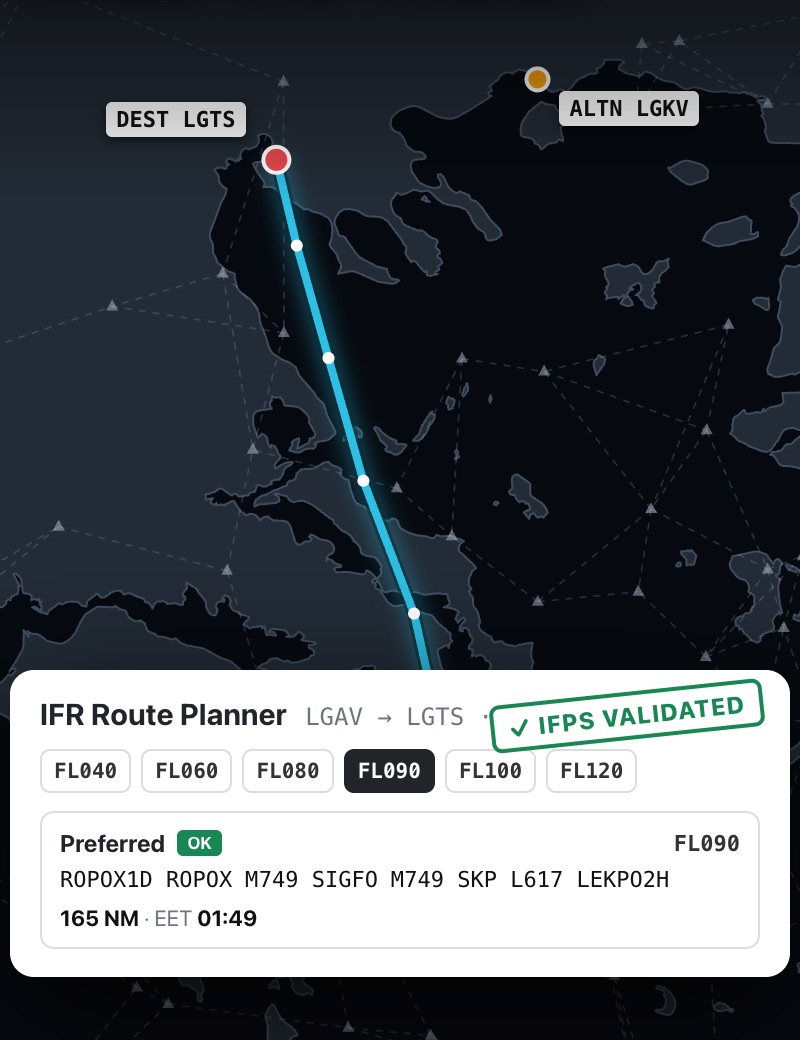
For IFR, compare up to six flight levels. BRIEF runs live EUROCONTROL routing, draws the route on the airway chart and checks it with IFPS. You see exactly what is wrong before you file. VFR plans go to the AFTN addresses that AviBRIEF works out for your route.

  • Live IFPS checks with clear error messages
  • Scheduled filing: choose a UTC time and AviBRIEF files the plan then
  • Quick FPLs for a fast one-off flight plan with no full flight setup
  • Field 18 remarks filled from aircraft, crew and passenger data
  • Delay, change or cancel a filed flight plan from the Actions menu, and refile when ATC asks for it
  • Messages from EUROCONTROL on the flight: accepted (ACK), rejected (REJ), manual processing (MAN) or suspended (FLS)
The BRIEF IFR route planner showing a EUROCONTROL route on the chart, flight level options and an IFPS validated badge
Briefing pack

One pack. Every document. Signed.

The briefing pack puts all the flight's paperwork into one document, signed by the PIC. Each part is filled from your flight data, with no retyping.

ICAO Flight Plan

The full ICAO FPL as a PDF, ready to print or file.

General Declaration

The GenDec, with crew and passenger lists taken from the flight.

Form 731

The Greek Form 731, including cost-sharing details.

Weight & Balance

Calculated for each leg from your aircraft's W&B profile, crew, passengers and fuel.

Weather & NOTAMs

GRAMET cross-section from autorouter, plus METAR/TAF and NOTAMs for the route.

Sign & print

Crew sign from a link sent by SMS or email. Then Direct Print sends every page to the printer. How it works
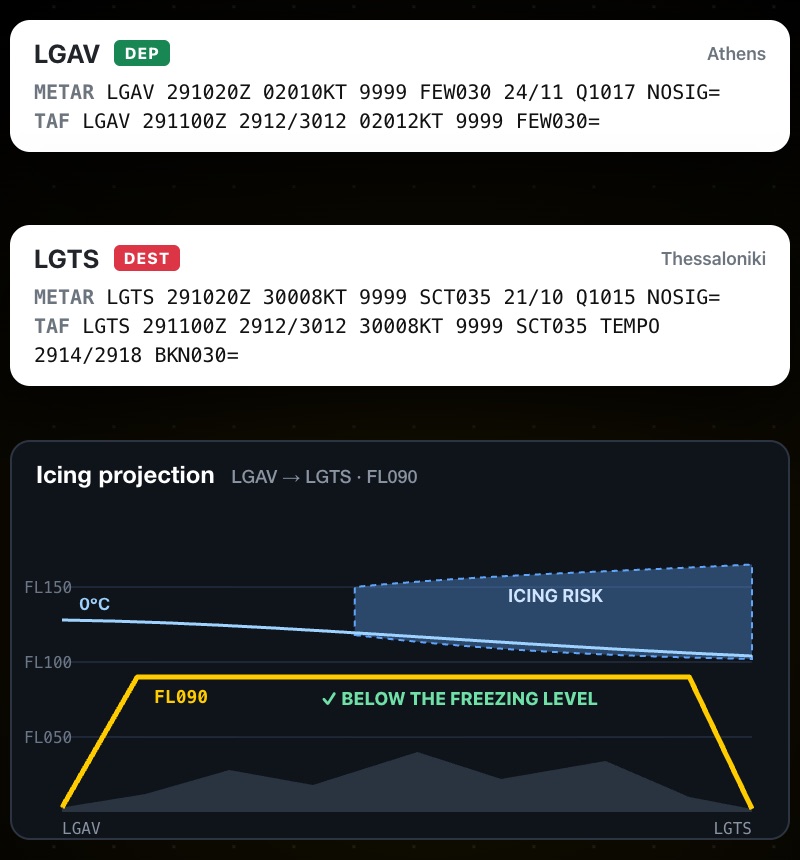
METAR and TAF for departure and destination, with an icing projection along the route
WeatherMETAR and TAF for departure and destination, plus an icing projection with the freezing level against your cruising level.
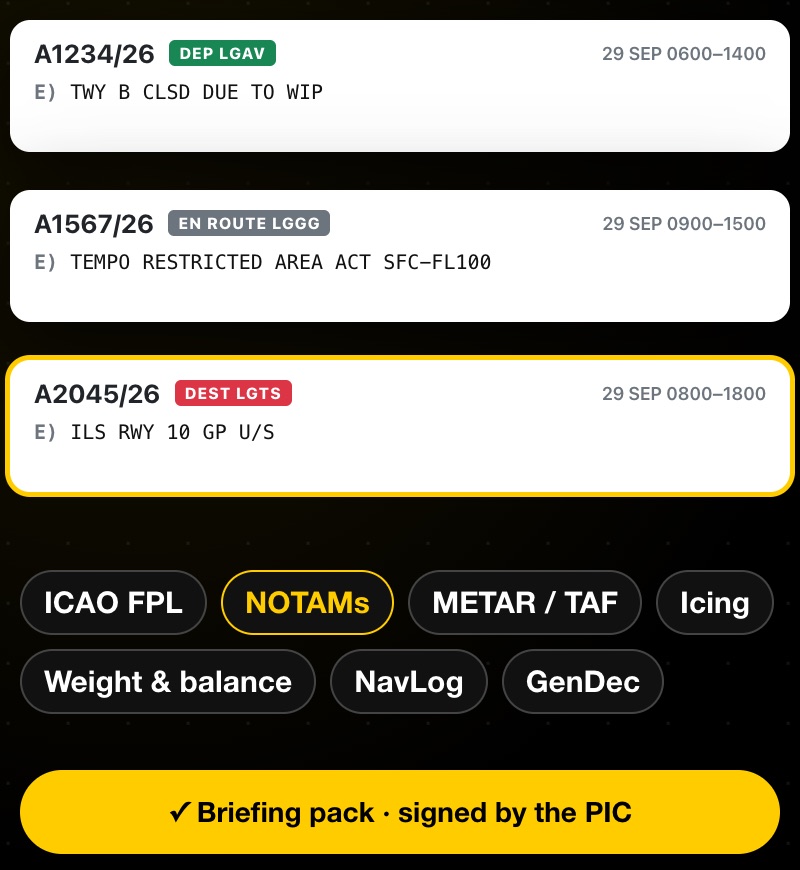
NOTAMs for departure, en route and destination, highlighted in the briefing pack
NOTAMsNOTAMs that matter for your route, at departure, en route and at destination.
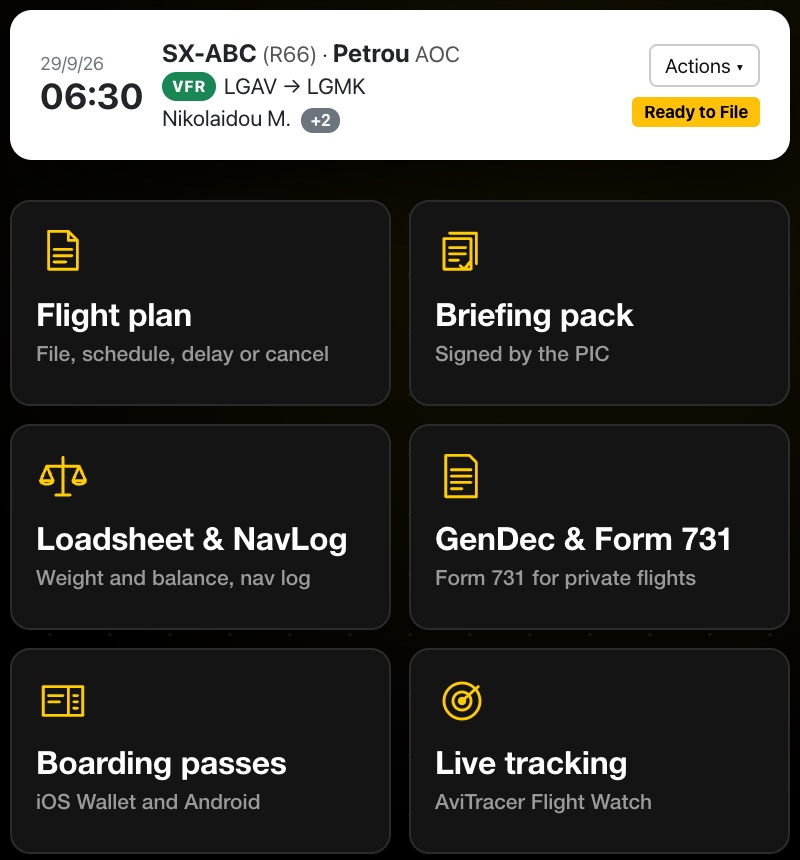
One Actions menu: flight plan, briefing pack, loadsheet and NavLog, GenDec and Form 731, boarding passes and live tracking
One Actions menuFlight plan, briefing pack, loadsheet & NavLog, GenDec, boarding passes and live tracking.
Direct Print

From the Actions menu to paper

Pick Direct Print… in a flight's Actions menu and send its documents straight to the printer. No downloading, opening and printing each PDF one by one.

  • One document or all of them: print a single document, or every page in one go
  • NOTAMs included: "Print all pages" adds the NOTAMs to the flight documents
  • Clear status: each document shows when it has been sent to the printer, with a one-click "Print again"
  • Only what applies: documents a flight doesn't have are marked "Not available for this flight"

Shown with demo data.

Weight & balance

Who sits where. What the CG does.

Drag passengers and cargo into seats and watch the loadsheet update. Works for aeroplanes and helicopters, with profiles from the R22 to the H145.
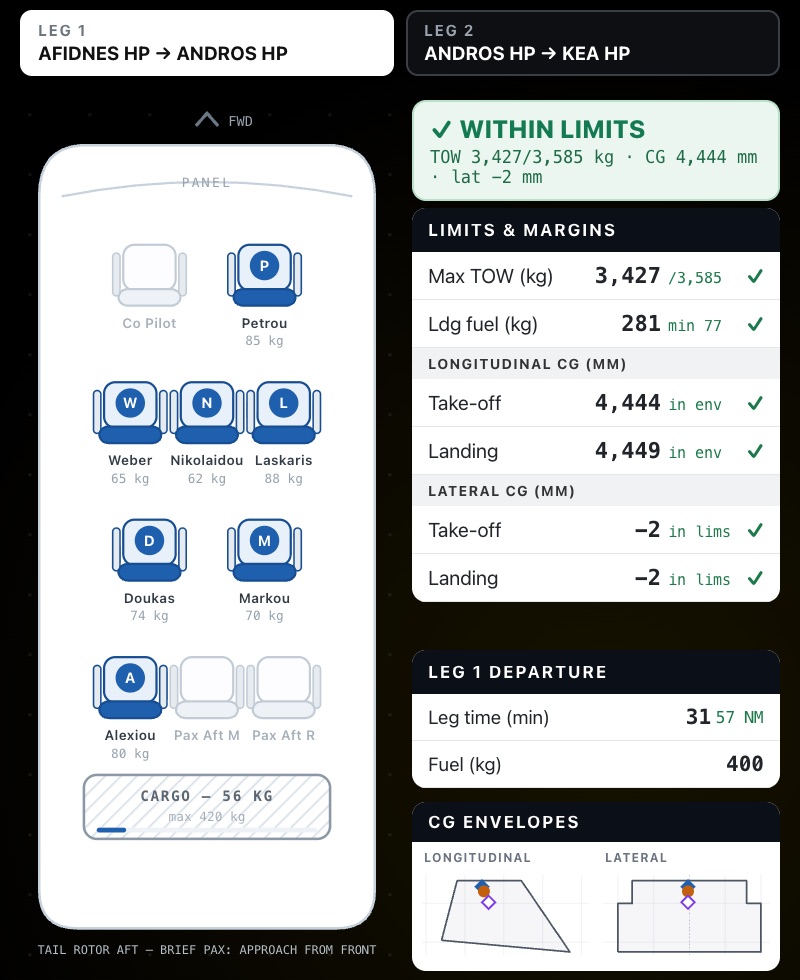
  • Take-off mass, landing fuel and CG at take-off and landing
  • Longitudinal and lateral envelopes, with lateral for helicopters
  • Every leg checked on multi-stop flights, as passengers get off along the way
  • Last-minute changes: fuel, no-shows or baggage are saved as a new revision, and the loadsheet is checked again straight away
Helicopter seating plan with passenger weights and cargo, next to limits and margins and CG envelopes
Risk assessment

No signature, no filing

Each new flight gets a risk assessment, emailed to the PIC, with the known fields already filled in. The form follows your own SOP, for AOC and training.

  • Scored risk levels: 13 items, from pilot experience and recent hours to density altitude, wind, visibility and external load, each scored 1 to 3. The total gives low (under 13), medium (14 to 20) or high risk (21 and over)
  • Required before filing: optionally, a flight can only be filed once the PIC or instructor has signed. There is room for the FOM to countersign
  • Your own SOP, with separate forms for AOC and training flights
  • Reminders: send the PIC a risk assessment reminder from the Actions menu, and download the signed form

Risk Assessment

Date:
29/09/26
Aircraft type:
R66
Pilot:
Petrou A.
Registration:
SX-ABC
LOWMEDIUMHIGH
Pilot experience (hours)> 15011501 – 15002< 5003
Pilot hours on type> 5011101 – 5002< 1003
Pilot's last flight< 10 days111 to 30 days2> 30 days3
Pilot flight hours in the last 4 daysless than 20h121 to 23 hours224 or more3
CrewMulti1Single2–n/a
Density altitude< 5000′15000′ – 7000′2> 7000′3
AerodromeFamiliar1Not familiar2–n/a
Wind< 15 kts116 – 30 kts2> 313
Visibility> 3 NM12 – 3 NM2< 2 NM or night3
RWYDry1Wet2–n/a
CRMPrimary pilot1–n/aOn call or relief3
Discomfort index< 20121 – 242> 253
External loadNo1–n/aYes3
LOW RISK < 1314 – 2021 > HIGH RISK
RISK SCORE15
PIC
FOM
Demo data
Flight schools

Training records, signed with the flight

Instructors and students keep their own lists, and every training flight carries its paperwork. Dual, solo and checkride flights are all set up the right way.

Training record

The instructor fills in the lesson number, exercises taught, scores and evaluation, and the record is signed. Its status shows on the flight board: pending, waiting for a signature, or signed.

Solo supervision

Solo flights are flown under a named supervisor, and the solo supervision certificate can be downloaded from the flight.

Reminders

Missing a signature? Send a training record or risk assessment reminder from the Actions menu in one click.

Routes

Save a route once, fly it many times

Save the routes you fly often: club circuits, island hops, IFR airway routes. New flights start from them.
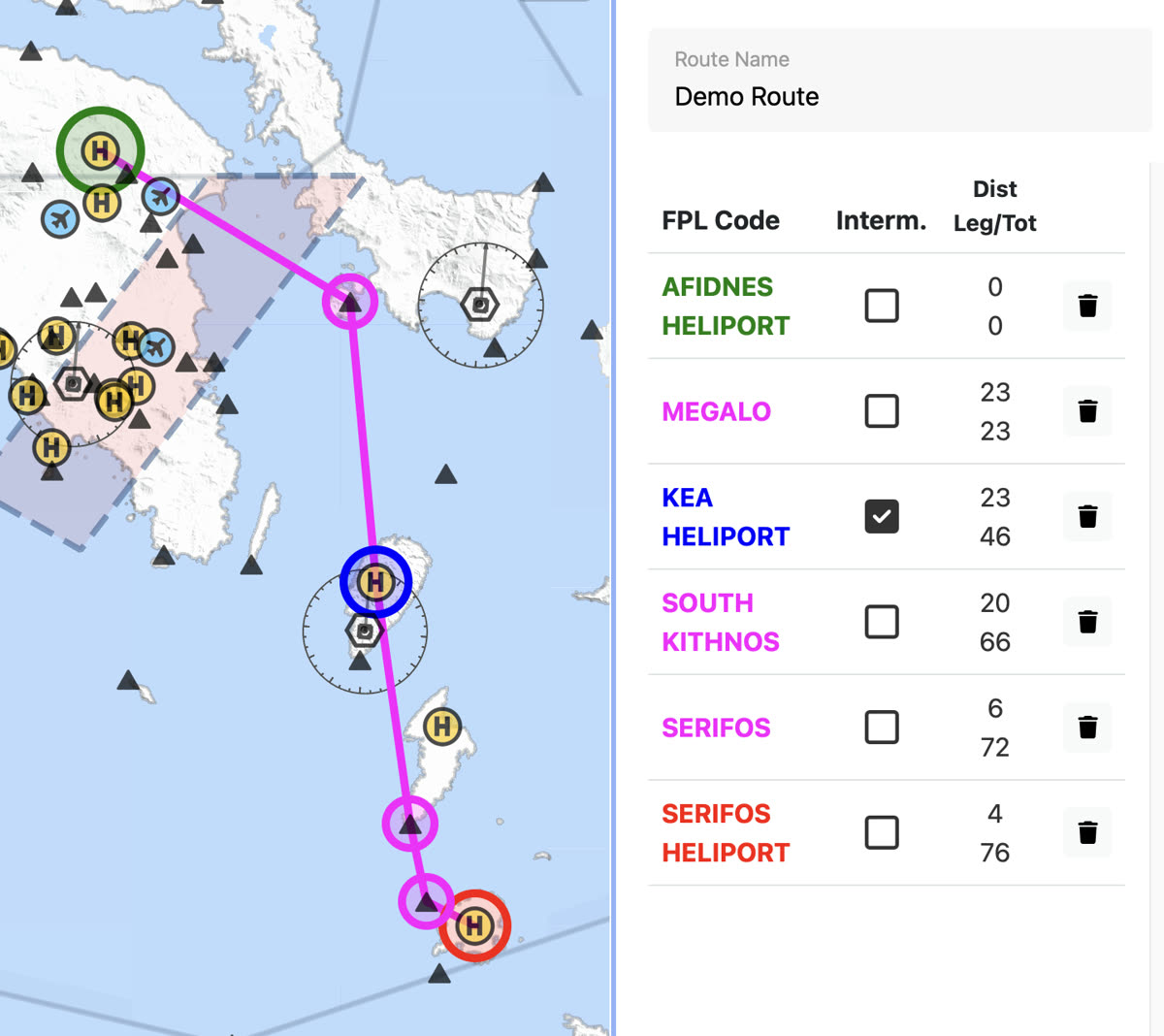
  • Departure, destination and intermediate stops, including heliports and private sites
  • Waypoints on the map, shown on Open Flight Maps charts
  • AFTN addresses worked out for you, and updated when the route changes
  • Reverse a route for the trip home
  • Leg and total distances for every point, with each point's FPL code
The BRIEF route editor with a demo VFR route on the map from Afidnes Heliport via Megalo, an intermediate stop at Kea Heliport, South Kithnos and Serifos to Serifos Heliport, with each point's FPL code and leg and total distances
Aircraft

Every tail number, fully set up

Each aircraft profile holds what the flight plan, fuel plan and W&B need. Set it up once and AviBRIEF fills it in on every flight. Works for helicopters and fixed-wing aircraft.

OrganisationFlight ID type, operator code and full FPL name
Aircraft infoRegistration and ICAO type designator
PerformanceNumber of engines and cruise speed
FuelFuel type, unit, burn per hour and capacity
Weight & balanceProfiles with empty mass, arm and lateral arm
Flight planEquipment, surveillance, SAR and Field 18 remarks
IFR / PBNMTOW, wake category, RVSM and 8.33 kHz
CapabilitiesPBN/, NAV/, COM/ and DAT/ codes
Crew & teams

Bring your whole team on board

Create a team for your school or operation and invite pilots by email. Team members work on the same fleet, routes and flights.

Team invitations

Invite crew by email and see who has accepted.

Pilots & students

Add pilots and student pilots, so training flights are set up correctly.

Several teams

Belong to more than one team and switch between them in one click.

Passengers

Passenger details, saved once

Save passenger details, including ID or passport, once. They flow into the GenDec, the W&B and the boarding passes.
  • ID and passport numbers and issuing country
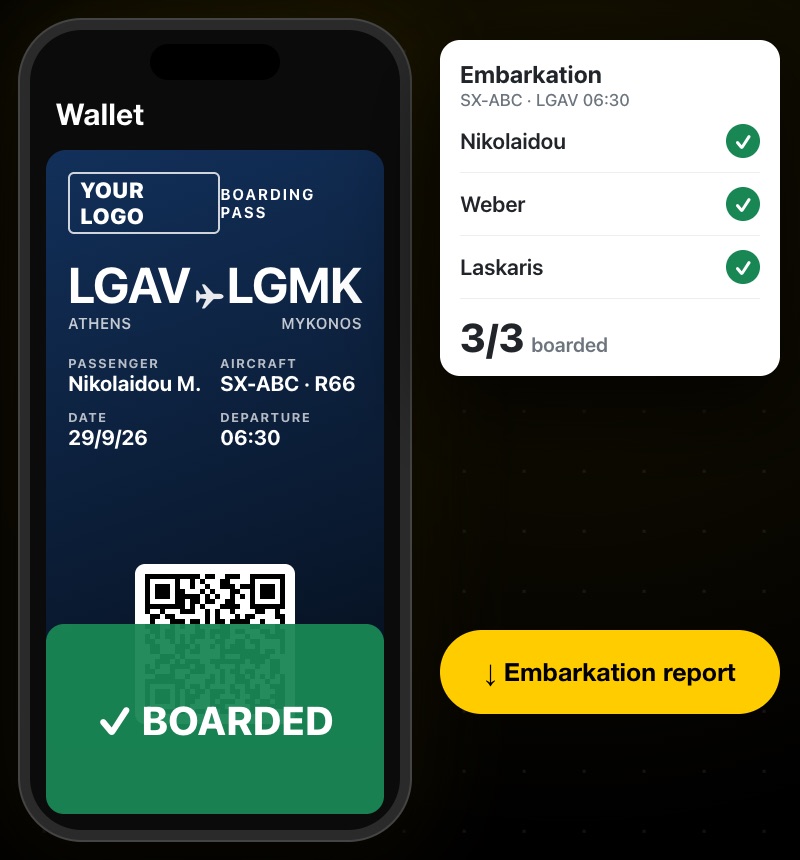
  • Boarding passes in iOS Wallet or on Android, in your branding, with flight updates and a tracking link with ETA
  • Scan passes at the aircraft, follow embarkation and download the report
  • Details checked by the people flying: crew and passengers get a link to confirm their details and sign, for the GenDec and Form 731
  • Live tracking: aircraft with an AviTracer Flight Watch device can be followed live from the flight
A BRIEF boarding pass in the phone wallet and the embarkation list
Airfield slots · Beta

Departure slots without phone calls

At participating airfields, book a departure slot as part of your flight. You will get an SMS and an email when the request is accepted or rejected, and the flight shows when a slot is allocated, revised or cancelled.

Run an airfield and want to take part? Get in touch.

Departure Airfield Slot · LGMGAllocated
Slot allocated06 OCT · 08:00Z
Confirmation sentSMS and email
Need a new time?Book a new slot to change departure
How-to

Create and file a flight plan, step by step

A five-minute walkthrough: route, flight, intermediate stop, weight & balance, filing and the briefing pack.

4:49 walkthroughCaptions in English and Greek

See it with your own flights

Create an account, add an aircraft and plan a real flight. You only pay when you file.